



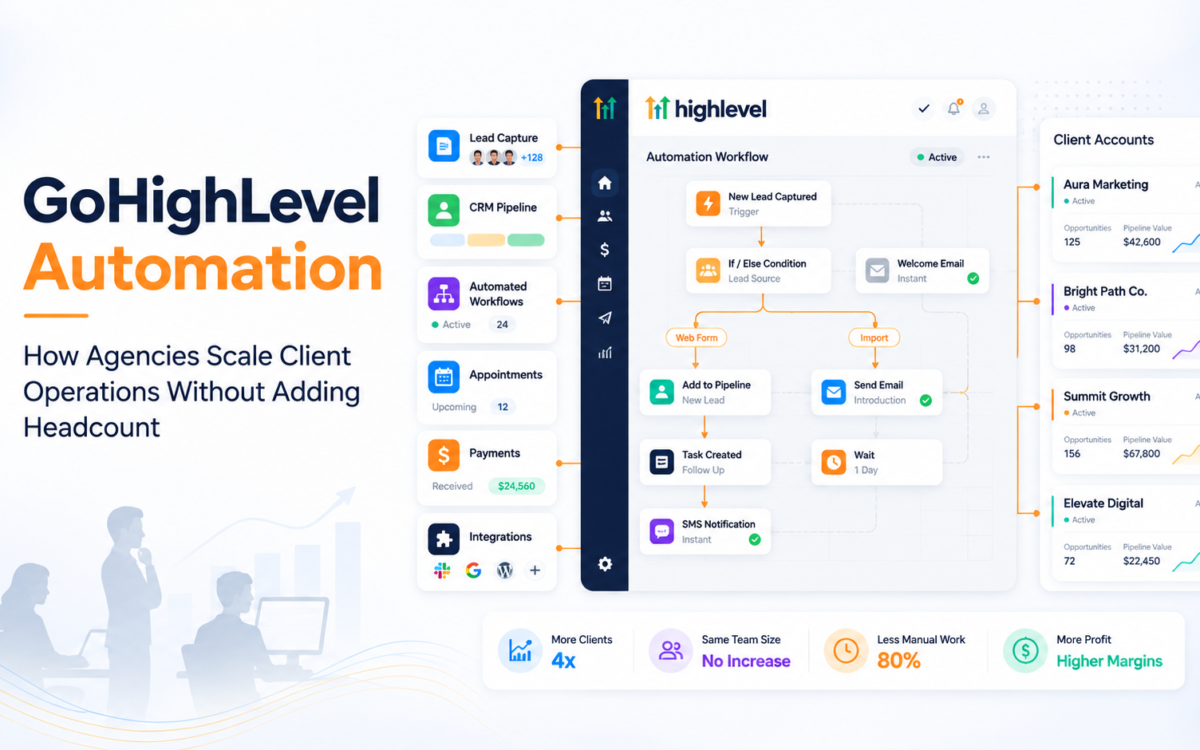
Managing client acquisition is only one part of running a growing agency. The harder problem often starts after a lead enters the system. Someone has to qualify it, assign it, trigger the right follow-up, update the pipeline, schedule appointments, send reminders, and keep the client informed. When these steps depend on people doing them manually, operational capacity becomes the constraint.
That is where GoHighLevel automation services can become valuable. GoHighLevel can bring CRM management, lead capture, workflows, pipelines, communication, appointments, payments, and integrations into a connected operating environment. For agencies, the opportunity is not simply to automate individual tasks. It is to orchestrate the customer journey so that more of the operational work happens automatically.
What Is GoHighLevel CRM and How Does It Work?
GoHighLevel is a CRM and marketing automation platform designed to help businesses manage leads, conversations, appointments, pipelines, campaigns, and other customer-facing processes from one system. Agencies can also use its account structure to manage multiple client environments while standardizing parts of their delivery.
The real value comes from connecting these functions. A lead captured through a website form, for example, can be added to a pipeline, assigned to a team member, placed into a follow-up workflow, and moved through different stages based on actions taken by the prospect. This turns the CRM from a contact database into an operational workflow.
For agencies, GoHighLevel setup and automation services can therefore cover much more than creating an account. The important work is designing how information and actions move through the system.
Why Are Agencies Moving Toward CRM Automation?
The biggest reason is operational scale. Adding another client traditionally means adding more campaign management, lead handling, reporting, follow-up, and administrative work. If every client requires manual intervention at each stage, headcount grows alongside revenue.
Automation changes that equation by turning repeatable processes into workflows. Instead of asking an account manager to remember every follow-up, the system can trigger appropriate actions based on predefined conditions.
The benefits of CRM automation for agencies can include:
- Faster lead response and follow-up
- More consistent client workflows
- Fewer repetitive administrative tasks
- Better visibility into pipeline movement
- Easier onboarding of new clients
- Greater delivery capacity without proportional headcount growth
The objective should not be to automate everything. Human involvement remains important for sales conversations, strategy, exceptions, and relationship management. Automation should remove repetitive work so teams can spend more time where human judgment matters.
How Agencies Use GoHighLevel for Client Automation
A practical agency implementation usually begins by mapping the client’s customer journey rather than immediately building workflows.
Consider a home services company receiving leads from Google Ads, Meta Ads, and its website. A well-designed system could capture the enquiry, identify the service required, create the opportunity, notify the appropriate salesperson, send an immediate acknowledgement, and trigger follow-up if the prospect does not respond.
The workflow can then change depending on what happens next. If the prospect books an appointment, the system can move the opportunity to another pipeline stage and stop irrelevant follow-ups. If the appointment is missed, a different sequence can begin.
This is the difference between basic automation and GoHighLevel workflow automation services. The latter is about designing a connected process around actual customer behavior.
What Should a CRM Pipeline Setup Include?
A CRM pipeline should reflect the client’s real sales process, not simply provide a collection of arbitrary stages.
A typical B2B or service-business pipeline might include:
- New enquiry
- Contact attempted
- Qualified
- Appointment booked
- Proposal or quote sent
- Decision pending
- Won or lost
The exact stages depend on the business. A CRM pipeline setup services project should define what causes an opportunity to move from one stage to another and what should happen automatically at each point.
For example, moving an opportunity into “Appointment Booked” could trigger confirmation messages and reminders. Moving it into “Proposal Sent” could initiate a structured follow-up sequence. Marking it as “Won” could trigger onboarding tasks.
This creates operational consistency without requiring employees to manually coordinate every step.
What Are Examples of CRM Automation Workflows?
The most useful workflows are usually tied to specific events and customer actions.
Common CRM automation workflow examples include:
- New lead capture followed by instant acknowledgement
- Appointment booking followed by reminders
- Missed appointment followed by rescheduling communication
- Proposal submission followed by timed follow-ups
- New customer conversion followed by onboarding
- Inactive lead followed by a re-engagement sequence
- Payment completion followed by service activation
For agencies, these workflows can be standardized and adapted for different clients. This creates a repeatable fulfillment model rather than rebuilding operational infrastructure from scratch every time.
How Can Agencies Connect GoHighLevel with Other Platforms?
CRM automation becomes significantly more useful when it connects with the other systems a business already uses.
Depending on the client’s requirements, CRM integration services for Stripe, Google, and other platforms can connect payment systems, calendars, advertising sources, communication tools, analytics platforms, and other applications.
For example, connecting Stripe can help associate payment activity with customer records. Connecting Google Calendar can support appointment scheduling. Advertising and lead-source integration can help agencies understand where opportunities originated.
The principle is simple: avoid forcing employees to move information manually between disconnected systems when a reliable integration can transfer it automatically.
When Should an Agency Outsource CRM Automation?
Agencies should consider outsource CRM automation services for agencies when CRM implementation has become a recurring delivery requirement but building a dedicated internal automation team does not make commercial sense.
This can happen when an agency starts offering CRM implementation as part of its client package, takes on several GoHighLevel accounts simultaneously, or needs specialized workflow expertise that its existing team does not have.
Outsourcing can provide access to specialists while allowing the agency to retain client ownership and strategic control. The important consideration is whether the fulfillment partner can follow the agency’s processes, maintain documentation, protect client data, and deliver consistently across accounts.
How Do You Manage Multiple Client CRMs Efficiently?
The challenge changes when an agency manages ten, twenty, or fifty client accounts. At that point, the agency needs systems for its own operations as much as systems for its clients.
A scalable model should standardize:
- Account onboarding
- Pipeline architecture
- Workflow naming and documentation
- Testing and quality assurance
- Reporting
- Access management
- Maintenance and troubleshooting
This is where GoHighLevel CRM setup and automation services for agencies can provide operational leverage. Reusable frameworks can reduce implementation time while still allowing workflows to be customized around each client’s sales process.
The goal is not to make every account identical. It is to standardize the underlying delivery process while customizing the customer journey where necessary.
What Are the Common CRM Automation Mistakes?
Automation can create as many problems as it solves when workflows are poorly designed.
Some common mistakes include:
- Building workflows without mapping the customer journey first
- Creating too many overlapping triggers
- Sending irrelevant messages after a prospect has converted
- Failing to define pipeline stage rules
- Not testing integrations before launch
- Automating communication that requires human judgment
- Building complex systems that nobody documents or maintains
The fix is usually better architecture rather than more automation. Every workflow should have a clear trigger, objective, action sequence, exit condition, and owner.
Agencies should also review automation regularly. A workflow that worked for a client’s original process may become inefficient after the business changes its sales model.
How Much Do GoHighLevel Setup and Automation Services Cost?
There is no universal cost of GoHighLevel setup services because implementation complexity varies significantly.
A basic CRM setup with pipelines and a few workflows requires far less work than a full implementation involving multiple integrations, migration, lead-routing logic, appointment automation, payment systems, and ongoing optimization.
When evaluating CRM automation pricing for agencies, consider the scope rather than comparing setup fees alone. A cheaper implementation that requires extensive internal troubleshooting can cost more than a properly architected system.
For agencies, ongoing CRM management and maintenance services can also make sense when client accounts require continuous workflow updates, troubleshooting, integration changes, and optimization.
Where Agentic Workflows Fit Into Agency Operations
The next stage of automation is moving from simple “if this, then that” workflows toward systems that can respond to context and coordinate multiple actions.
An agency could, for example, build a workflow where a new lead is captured, categorized according to defined criteria, routed to the appropriate pipeline, followed up automatically, and escalated to a human when a specific condition is met.
The important principle is still human oversight. Automation should make operational velocity higher without removing accountability.
For agencies, that can create a powerful advantage: more client activity handled through the same operational infrastructure, without continuously increasing internal headcount.
Conclusion
GoHighLevel automation services can help agencies turn CRM infrastructure into a scalable delivery system. The strongest implementations connect lead capture, pipeline management, communication, appointments, payments, integrations, and follow-up into a coordinated customer journey rather than treating each function as a separate task.
Key Takeaways
- Build the customer journey before building automation workflows.
- Use pipelines to represent actual sales processes and define clear movement rules.
- Automate repetitive follow-up, routing, reminders, and administrative tasks.
- Integrate GoHighLevel with the platforms clients already use.
- Standardize agency delivery processes while customizing workflows for individual clients.
- Test, document, and maintain automation instead of treating implementation as a one-time project.
- Use automation to increase operational capacity, not to eliminate necessary human interaction.
The real advantage of CRM automation is not having more workflows. It is being able to handle more customer activity with greater consistency while keeping your team focused on strategy, sales, and client relationships.
Scale Client CRM Delivery with Digital Marketers India
At Digital Marketers India, we help agencies build and manage scalable CRM and marketing automation systems, including GoHighLevel setup, workflow development, pipeline configuration, integrations, migration, and ongoing management. Our approach is designed to help agencies increase delivery capacity without adding unnecessary operational complexity or internal headcount.
Whether you need support with a new client implementation or ongoing fulfillment across multiple accounts, contact us now. Explore our services and book a Growth Discovery Call to discuss how we can support your agency’s automation and growth requirements.
Frequently Asked Questions
What are GoHighLevel automation services?
These services involve configuring CRM pipelines, workflows, lead capture, communication, appointments, integrations, and other automated processes inside GoHighLevel to reduce repetitive manual work and improve customer journey management.
How do agencies use GoHighLevel for client automation?
Agencies can use GoHighLevel to manage client pipelines, capture leads, automate follow-ups, schedule appointments, manage communication, connect external platforms, and standardize repeatable customer processes across multiple client accounts.
Can agencies outsource GoHighLevel automation?
Yes. Agencies can outsource CRM automation services for digital marketing agencies to specialist fulfillment teams that handle setup, workflow development, integrations, troubleshooting, and maintenance while the agency retains the client relationship.
What does GoHighLevel setup include?
A typical setup can include CRM configuration, pipeline creation, workflow development, forms, calendars, lead routing, integrations, user permissions, testing, and documentation. The exact scope depends on the client’s operational requirements.
How much does GoHighLevel automation cost?
Pricing depends on the complexity of the implementation. Basic setups cost less than projects involving multiple pipelines, integrations, migrations, advanced workflows, and ongoing maintenance. Agencies should evaluate total implementation scope rather than comparing setup fees alone.