




Sitemap is one of the most important parts of on page optimization. Any SEO expert will assure to create a well-defined sitemap.xml and will submit it in the search console. Also, it is important to resolve all error in the webmaster to assure each webpage of your site is indexed in the search engines like Google.
If you’re unaware of the power of sitemap, please read our article Complete Guide On Sitemap.
In this article, I will share how to submit your sitemap.xml in the Google Webmaster which is also known as Google Search Console. So here is the step-wise guide with pictures:
- Open https://www.google.com/webmasters/
- Click on “Sign In” on Top.

After logging in you will see all websites for which you have access.
- Click on the name of the website you want to add sitemap for

- On the left sidebar, click on Crawl -> Sitemaps
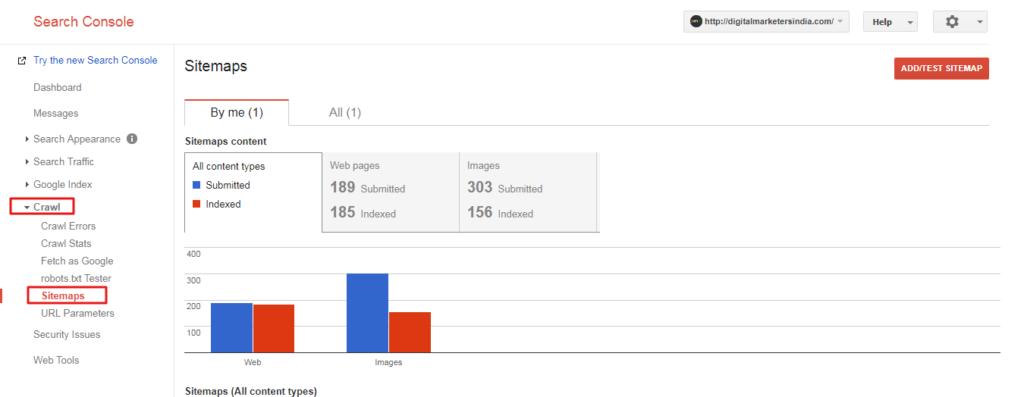
- Click on Add/Test Sitemap button on the top right corner of the screen
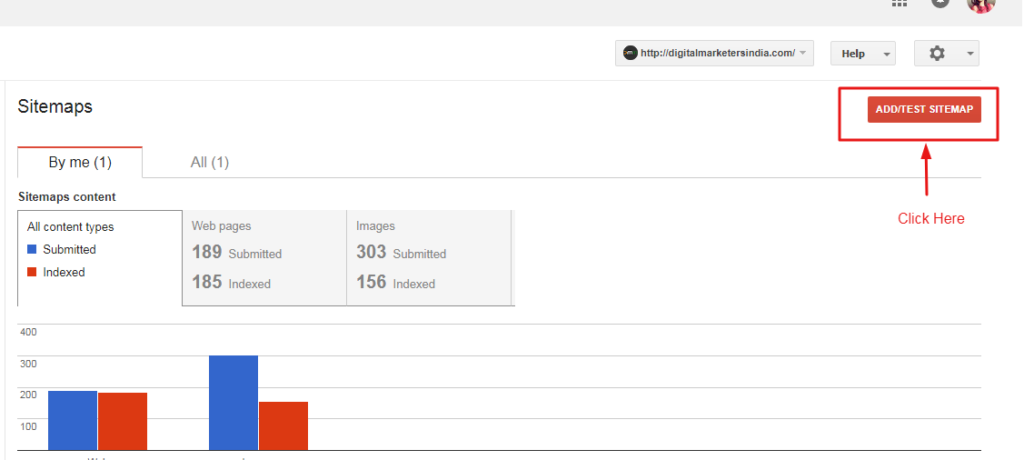
- Add just sitemap file name and not the complete URL.
Example: sitemap.xml or sitemap_index.xml

*Note: You don’t need to add forward slash either.
- Click on test. (I highly recommend testing before submitting)
It will test the sitemap. Click on “View Test Result to see the result and then close it to come back to main screen.If there are any errors or warning it will be displayed so you can resolve it before submitting the sitemap. If everything is okay, you can move ahead to submit it.
- Click on Add/Test Sitemap button on the top right corner of the screen
- Add sitemap file name without preceding URL
This is it. Your sitemap is added. In simple words, your request to index your pages is sent to Google. It would take some hours to days to execute your request by Google.
The same page of sitemap in Google will also show the status of submitted and indexed pages, images, videos, etc. It is possible that indexed pages are less than submitted URLS. You can see more details about the indexed pages by clicking on the sitemap name that is submitted by you.

You can dig deeper by clicking on the links to find how many pages are submitted and how many are indexed.
Please be advised that the indexed pages mean your webpages are crawled and indexed in the Google’s database. It doesn’t mean you will get top rankings for that. To get top rankings, you should use either best SEO service or expert digital marketing services.
This was today’s lesson for SEO beginners and SEO enthusiasts. Please feel free to ask your queries in the comment section.
About Author: Ash Vyas
 Ash Vyas has 10+ years of practical experience in digital marketing and international business development. She has written 100s of articles on various topics to live her passion of helping people with her knowledge and expertise. In addition to directing Digital Marketers India, Ash also delivers keynote sessions and holds key positions in some international companies as a consultant, director of operations and mentor.

admin
Related News



How Search Engines Work?

Top 3 Digital Marketing Services for SMBs and Startups

Search Bots and Spiders: Quick Guide